 Weather
Commute and school run
Weather Widget for the Commute and School Run
The morning weather decision is small but constant: jacket or not, umbrella or not, sunscreen for the kids or not. A widget on the home screen answers it in the time it takes to unlock your phone.
The two-minute morning check
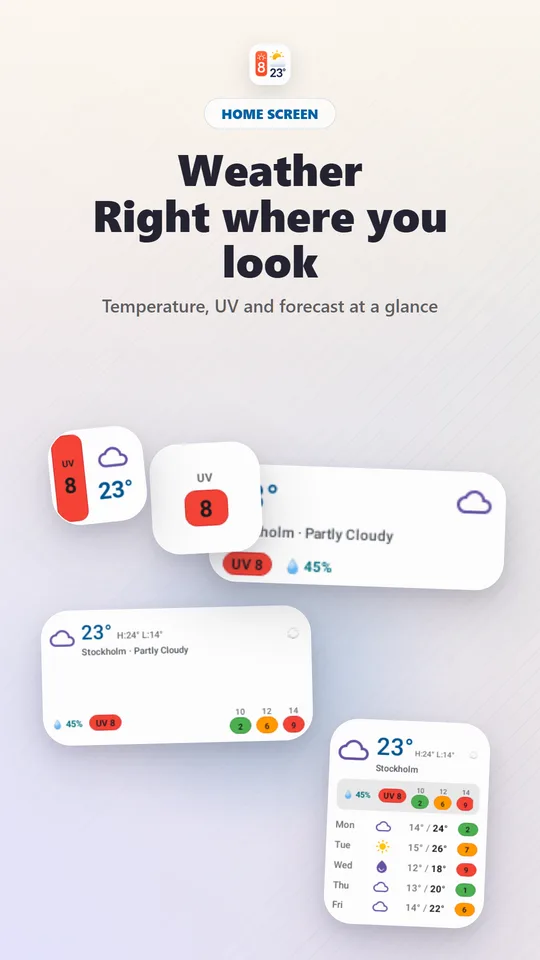
- Current temperature and conditions — what you walk out into.
- Today's high and low — what you need to be ready for by the evening commute or school pick-up.
- UV windows — whether sunscreen and hats are needed for playground, sports or lunchtime.
- Humidity — on warm days, a hint that the afternoon will feel hotter.
The large widget shows current weather, UV windows and the coming days together, so everything above is visible without opening the app.
Dress for the whole day
The biggest commute mistake is dressing for 8 am and getting caught out at 6 pm. If the gap between low and high is more than about 8–10 °C, go for layers you can take off. If the evening will be colder than the morning — common in autumn — pack the extra layer now.
For the school run
- Check before breakfast, not at the door. It leaves time to find hats, boots or a raincoat.
- Look at the UV windows for break times and after-school activities, not just the morning.
- Glance at tomorrow in the week view the evening before: laying out clothes then saves the morning rush.
- Children overheat and burn faster than adults — pack water and a hat on UV 3+ days.
Cyclists and walkers
If you commute on foot or by bike, the forecast matters more: wet roads, strong sun and cold hands all change the ride. Use the 7-day forecast on Sunday evening to see which days might need the bus instead.
Let reminders do the remembering
An optional reminder at 08:00 can include the current weather and upcoming UV, so the check happens even on chaotic mornings. Add 16:00 if you do the afternoon pick-up. See the UV reminders guide for which times suit which routine.
Place the widget on your first home screen. The check only becomes automatic if it happens without a decision. A small widget next to your transport or calendar app is enough.
Location and refresh
The widget uses your current location or a point you pick on the map — useful if you want the weather at your office or the school rather than at home. Medium and large widgets have a manual refresh button; use it if you have been offline, since cached readings can be out of date. For storms, ice or extreme heat, follow official local warnings.
Frequently asked questions
Can the widget show weather for my office instead of my current location?
Yes. You can use your current location or select a place on the map, such as your office or your child's school.
Can I get a weather reminder in the morning?
Yes. The optional 08:00 reminder can include the current weather and the upcoming UV, so you can decide what to wear before leaving.
How do I refresh the widget before leaving?
Medium and large widgets have a manual refresh button, and you can also refresh in the app.
Sources and further reading
How this article was created
This article was drafted with the help of artificial intelligence and edited against the app's published feature list. The independent developer is responsible for publication and accepts correction reports. Verify health, safety, legal, financial and official requirements with a primary source or qualified professional.
Questions and corrections: brightwaveapp@gmail.com. Legal and privacy information.